Free Word Search for Kids: A Practical Resource for Creators and Educators
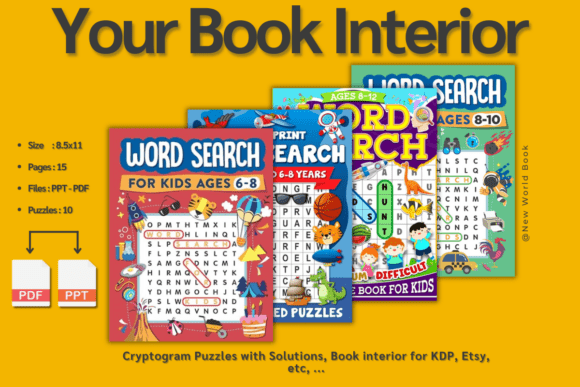
Free Word Search for Kids isn’t just a collection of puzzles—it’s a flexible, production-ready asset designed to integrate smoothly into real-world creative and educational workflows. Whether you’re developing an activity book for KDP, designing a classroom resource, building a branded journal for Etsy, or assembling a wellness toolkit for clients, this interior delivers 100 carefully selected words across 10 themed puzzles—each with clean layouts, consistent typography, and full answer pages included.
What makes it especially valuable is its intentional design for customization. It arrives as a print-ready PDF interior, not a locked image or flattened template. That means you can open it in Adobe InDesign, Affinity Publisher, or even Canva (with proper PDF import settings), adjust fonts, tweak colors, insert your logo or cover branding, add instructional text, or restructure page order—all without compromising print quality or readability.
Where It Fits in Your Project Lifecycle
Think of Free Word Search for Kids as a modular component—not a finished product. Its utility emerges most clearly when mapped to specific phases of your workflow:
- Before launch: Use it as a foundation during the prototyping stage. Test puzzle difficulty, spacing, and visual hierarchy with a small group of target users—teachers, parents, or beta readers—before investing in full cover design or marketing assets.
- During development: Drop individual puzzle pages directly into multi-section activity books alongside mazes, coloring pages, or logic grids. Its consistent 8.5" × 11" trim size and CMYK-ready formatting reduce prepress friction and speed up file handoff to printers or platforms like Amazon KDP.
- After publication: Repurpose puzzles as lead magnets—embed one themed page in a newsletter, convert another into a printable worksheet for your blog, or extract vocabulary lists for lesson plans. The included answer keys make verification fast and error-free.
This adaptability means the interior doesn’t replace your strategy—it supports it. You decide the audience, tone, and purpose. The puzzles provide structure; you supply context, voice, and value.
Integration With Tools and Platforms
Free Word Search for Kids works best when treated as part of a broader content ecosystem—not a standalone download. Here’s how it connects with common tools and decisions:
If you use Adobe InDesign, import the PDF as linked assets to maintain editability while preserving vector clarity. Adjust column widths to match your existing grid system, or scale puzzle grids uniformly to fit tighter margins without distorting letter spacing.
On Etsy, pair it with original cover art and a short “How to Use This Book” intro page. Buyers respond well to clear usage notes—e.g., “Great for car rides, rainy-day learning, or calm-down corners”—so adding those lines yourself increases perceived value and reduces support queries.
For educators using Canva, extract single puzzle pages as PNGs at 300 DPI, then layer them over custom backgrounds or add speech bubbles for guided instruction. Because the interior is intentionally minimal—no watermarks, no distracting graphics—it adapts cleanly to both digital and printed delivery.
When publishing via Amazon KDP, verify bleed and margin settings against current KDP guidelines before final export. The interior’s clean layout minimizes risk of cutoff or misalignment—but always run a physical proof copy first. Consistency here protects your review ratings and long-term listing health.
Practical Implementation Tips
Customization isn’t optional—it’s required by the license—and doing it thoughtfully pays off in usability and professionalism. Here’s how to approach it efficiently:
- Start with audience alignment: Review the 10 themes (e.g., animals, weather, space, food). If your target readers are early elementary teachers, consider expanding the “school supplies” puzzle with terms like *glue stick*, *dry-erase*, or *clipboard*. For ESL learners, swap in high-frequency vocabulary aligned with CEFR A1–A2 bands.
- Preserve readability: Avoid shrinking font sizes below 12 pt for puzzle grids or 10 pt for answer keys. Use sans-serif fonts (like Open Sans or Montserrat) for clarity—especially if printing on lower-grade paper or distributing digitally to varied devices.
- Organize for flow: Group puzzles by increasing complexity—start with horizontal-only words, progress to diagonals, then introduce backward placements. This creates natural scaffolding, whether used in a classroom or self-paced learning.
- Build in quality control: Print one puzzle page, solve it manually, and cross-check against the answer key. Then repeat with a second page using a different method—e.g., scanning with OCR or testing on a tablet. Small errors compound quickly across 100 words; catching them early prevents post-launch corrections.
Also note: The interior includes full answer pages, but they’re placed separately—not adjacent to each puzzle. That’s intentional. It supports multiple use cases: teachers can remove answer pages before distributing to students; app developers can hide them behind a toggle; and journal designers can place them in a back-of-book appendix for integrity and reuse.
Long-Term Usability and Scalability
Because Free Word Search for Kids is delivered as editable source material—not a fixed JPEG or locked PDF—you retain full control over versioning. Save your edited master file with clear naming (e.g., WordSearch_Kids_v2_English_Spring24.indd) and archive backups in cloud storage with version history enabled. This habit protects against accidental overwrites and streamlines future updates—say, swapping out seasonal themes or localizing vocabulary for UK or Australian English.
It also scales well across formats. Convert the same interior into a 6" × 9" digest version for pocket-sized journals, or expand it into an 8.5" × 11" teacher edition with added facilitation notes. Because the core content is neutral and modular, you’re not rebuilding from scratch—you’re repurposing with intention.
And because it’s free to use—with the only restriction being meaningful customization before redistribution—it lowers your barrier to experimentation. Try bundling it with a matching crossword interior. Combine it with a handwriting practice guide. Layer it into a summer learning challenge tracker. Each iteration teaches you something about your audience’s preferences, helping refine your next paid product more effectively.
In short, Free Word Search for Kids is less about solving puzzles—and more about enabling better planning, smoother execution, and smarter iteration. It’s a tool that earns its place in your workflow not by doing the work for you, but by removing friction where it counts: consistency, compatibility, and clarity.